

For aspiring medical and dental students in Pakistan, the Medical and Dental College Admission Test (MDCAT) is the most critical milestone of their academic journey. The pressure to score high is immense, but before you even step into the examination hall, there is a foundational hurdle you must clear flawlessly: the official Pakistan Medical & Dental Council (PMDC) registration process.
Every year, thousands of students jeopardize their hard work by making simple, avoidable errors during the initial signup phase. A mismatched name, a typo in the identification number, or an incorrect email address can lead to roll number slip delays, result complications, or even disqualification.
If you are looking at the signup screen and feeling overwhelmed, you are not alone. This comprehensive guide breaks down the PMDC MDCAT 2026 portal account creation process step-by-step, ensuring your application gets accepted without a hitch.
The Core Strategy: Why First-Time Accuracy Matters
The official signup interface features a prominent, red warning: “MAKE SURE ALL INFORMATION FILLED IN THE BELOW FORM IS CORRECT BEFORE SUBMISSION.”
This warning exists because the PMDC portal locks certain primary data fields after submission to prevent identity fraud and duplicate applications. Modifying these details later often requires manual verification, helpline calls, or visiting the PMDC headquarters—stressful distractions you cannot afford while preparing for a highly competitive exam.
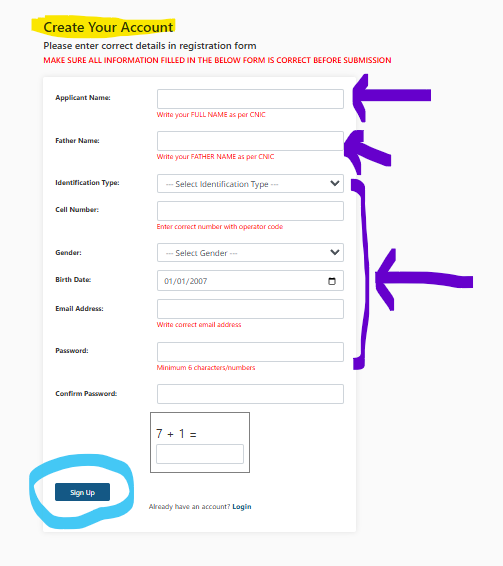
As shown in the portal interface image, the signup page requires a series of specific personal and security identifiers. Let’s look at exactly how to fill out each field accurately.
Step-by-Step Breakdown of the PMDC MDCAT Signup Form
1. Applicant & Father’s Name (As Per CNIC)
- Applicant Name: Type your full legal name exactly as it appears on your Computerized National Identity Card (CNIC), B-Form, or passport. Avoid using nicknames, abbreviations, or missing middle names.
- Father Name: Enter your father’s name precisely as documented on your government-issued identity papers.
Critical Tip: If your CNIC spells your name as “Muhammad Ahmad,” do not write “M. Ahmad” or “Ahmad” alone. Spelling mismatches between your registration profile and your physical ID card can lead to being barred from the examination center on test day.
2. Selecting the Correct Identification Type
The portal accommodates different student age brackets and backgrounds by offering four distinct identification options. Choosing the correct one is vital for your verification process:
| Identification Type | Who is it for? | Key Requirement |
| CNIC | Applicants aged 18 or above residing in Pakistan. | Must be valid and issued by NADRA. |
| B-FORM | Domestic applicants under the age of 18. | The National Identity Number listed on the child registration certificate. |
| NICOP | Overseas Pakistani citizens holding dual nationality or living abroad. | Valid National Identity Card for Overseas Pakistanis. |
| Juvenile-Card | Citizens under 18 who have opted for a chip-based smart ID card. | Issued by NADRA for minors. |
3. Contact & Demographic Details
- Cell Number: Enter an active mobile number starting with the correct network operator code (e.g., 0300, 0333, 0345). Do not use a number that is currently converted or ported to another network, as automated SMS alerts from PMDC regarding test dates, venues, and results may fail to deliver.
- Gender: Select Male or Female from the dropdown list.
- Birth Date: Use the built-in calendar picker tool to select your exact date of birth as recorded by NADRA.
4. Digital Credentials & Account Security
- Email Address: Provide a highly secure, functional personal email address that you check daily. Avoid using older accounts to which you might lose access, or temporary emails set up by internet cafe operators. All official correspondence, password reset tokens, and registration confirmations will be routed here.
- Password Strategy: Choose a password that is a minimum of 6 characters long. For optimal security, mix uppercase letters, lowercase letters, and numbers. Confirm the password by retyping it exactly in the subsequent field.
5. Passing the Human Verification Captcha
To prevent automated bots from overloading the server, the PMDC registration page includes a straightforward mathematical challenge (e.g., 6 + 5 =). Compute the total, input the correct digit in the box, and click Sign Up to complete the initial phase.
Common Registration Mistakes to Avoid
- Using a Friend’s or Cyber Cafe’s Email: If an internet cafe worker creates your account using their own email, you risk losing access to your profile when crucial updates, roll number slips, or result notifications are sent out. Always use an account you personally control.
- Confusing CNIC and B-Form Numbers: The number format is identical, but ensure you select the correct dropdown type corresponding to the physical card you will carry to the test center.
- Ignoring Typos Before Clicking Submit: Take 60 seconds to cross-reference every single line with your physical identity card before finalizing the registration.
Troubleshooting Tips for Common Portal Issues
The Page Fails to Load or Times Out
During peak registration hours, thousands of applicants attempt to access mdcat.pmdc.pk simultaneously, causing server lag. If the page freezes or fails to submit:
- Clear your web browser’s cache and cookies.
- Switch to a stable desktop browser like Google Chrome or Mozilla Firefox instead of using a mobile device.
- Try completing your registration during off-peak hours, such as late at night or early in the morning.
Did Not Receive a Confirmation Email?
If you completed the signup form but haven’t received a validation link:
- Check your Spam, Junk, and Promotions folders; automated system emails are frequently miscategorized by email filters.
- Wait 15–30 minutes before trying again, as high server traffic can delay email dispatch queues.
Summary & Next Steps
Creating your portal account is only the first phase of securing your exam seat. Once you successfully hit the Sign Up button, you will need to log back in using your credentials to upload your passport-sized photographs, enter your academic marks (SSC/HSSC or equivalent), select your preferred city test center, and print out the bank fee challan.
Treat this administrative step with the same focus and discipline you give your study routine. Double-check your documents, input your data methodically, and set yourself up for a smooth, distraction-free journey toward your medical career goals.